A small utility for macOS Finder
Add Back and Forward to Finder’s Right-Click Menu
Right-click empty space in Finder. Move back or forward with a small navigation bar attached to the context menu.
$9.99 USD · one-time purchase
Buy FinderBack — $9.99One-time payment. Instant download. No compiling.
For Apple Silicon · macOS 26 or later. First-launch instructions.
Prefer to build it yourself? The source is free on GitHub.
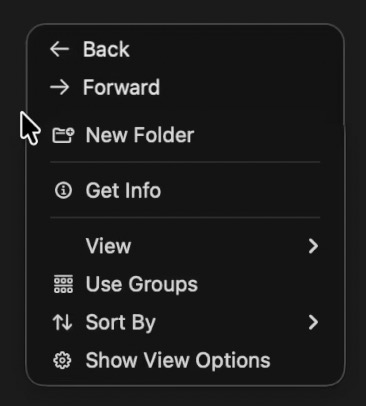
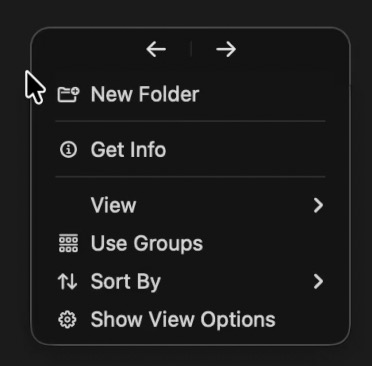
Two styles. Same simple action.
Choose stacked Back and Forward labels or a compact row of arrows.
At home in your menu bar.
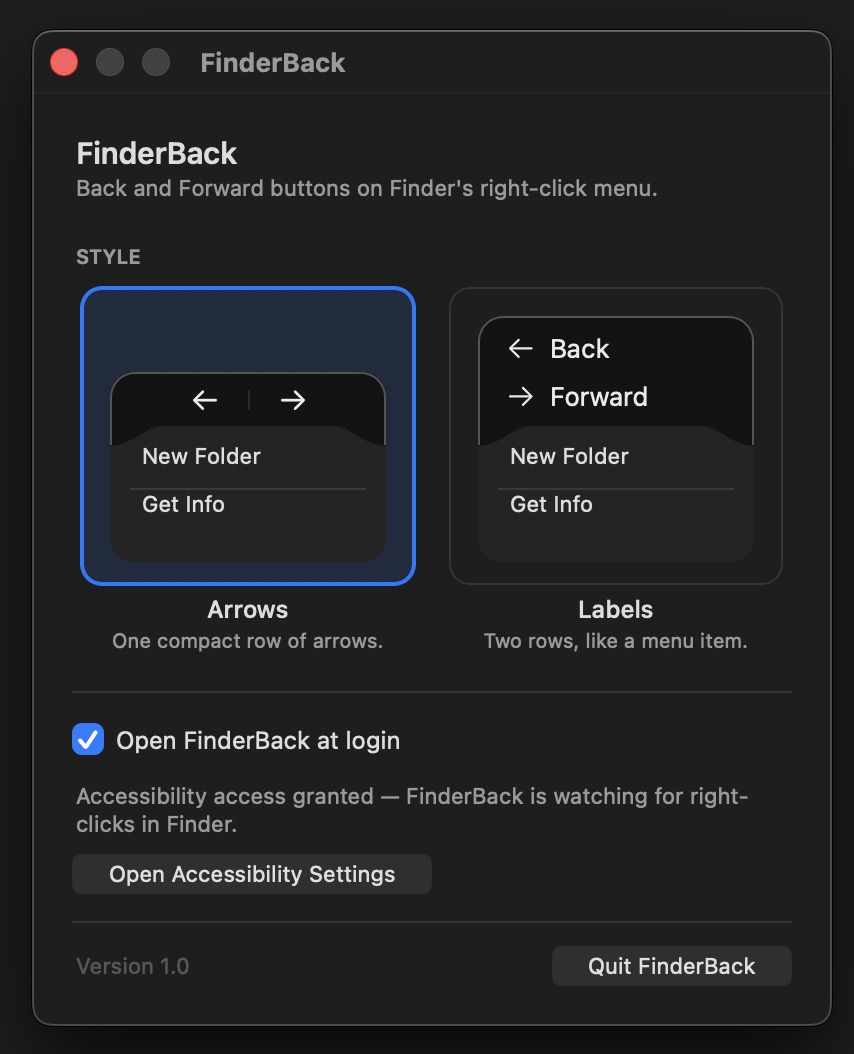
Change the style in Settings and optionally open FinderBack at login.
Small by design.
No analytics, tracking, or network requests in the app. Source code you can inspect.
See FinderBack in action
52-second silent demo: right-click empty space in Finder, then use Back and Forward to navigate. Open the video.
A look at Settings
Product details & terms
FinderBack is a downloadable macOS utility for people who prefer using the mouse to navigate Finder. It is original software written in Swift, with source code published under the MIT License.
Price and what’s included
The price is $9.99 USD as a single purchase, with no subscription. There is one paid option: the compiled FinderBack app with both navigation styles, Settings, and Open at Login. You pay for the convenience of a ready-to-run build; the free source version has the same features. Any applicable taxes will be shown at checkout.
Availability and delivery
Buy the ready-to-run app through our Lemon Squeezy checkout. Your download is delivered automatically after purchase and includes FinderBack 1.0, installation instructions, the MIT license, and file checksums. There is no physical shipment, custom work, or service appointment.
Compatibility and installation
Tested on Apple Silicon running macOS 26. This packaged build requires an Apple Silicon Mac and macOS 26 or later; it does not run on Intel Macs or earlier macOS versions. Move FinderBack to Applications, then open it and enable Accessibility in System Settings → Privacy & Security. The download is not Developer ID-signed or notarized, so macOS normally requires you to choose Open Anyway in Privacy & Security on first launch. Instructions are included. Please check these details before purchasing.
License and refunds
FinderBack is provided under the MIT License, including its warranty and liability terms. Refunds are not offered after digital delivery except where required by law or the payment platform. This does not limit applicable consumer rights or the checkout provider’s ability to issue a refund. See Lemon Squeezy’s refund information.
Privacy and contact
The app does not read filenames, paths, or your files, and does not send network requests. Your selected style is saved locally in macOS preferences. This website has no analytics scripts, forms, or advertising cookies. Its hosting provider may process standard connection information to serve the page. For product questions or support, open an issue on GitHub (a GitHub account is required).